
Running an e-commerce store means juggling product uploads, customer service, and trying to maintain a social presence. Manual Pinterest content creation can take hours each week until you build an automated workflow. We do that here using FREE accounts. We aren’t re-inventing the wheel or creating an amazing AI agent, tools have been around to automate social posts for decades, but this one has a unique twist that re-writes the content keeping it fresh for the platform.
The setup is in Make.com and runs through ChatGPT for content optimization, then publishes to Pinterest automatically. No more copy-paste descriptions or repetitive posting.
The Setup Process
Start by exporting all products from your e-commerce site and selecting the two best images for each product. This creates a spreadsheet with product titles and descriptions, duplicate rows to accommodate both images per product. Upload all images to Dropbox and add download links to the spreadsheet.
This step was a bit tedious and took a few hours. Could it have been automated futher? Probably, but the work was worth it. In our case the math: 200 products × 2 images = 400 pins. Spread across a year, that’s consistent content without daily manual work.
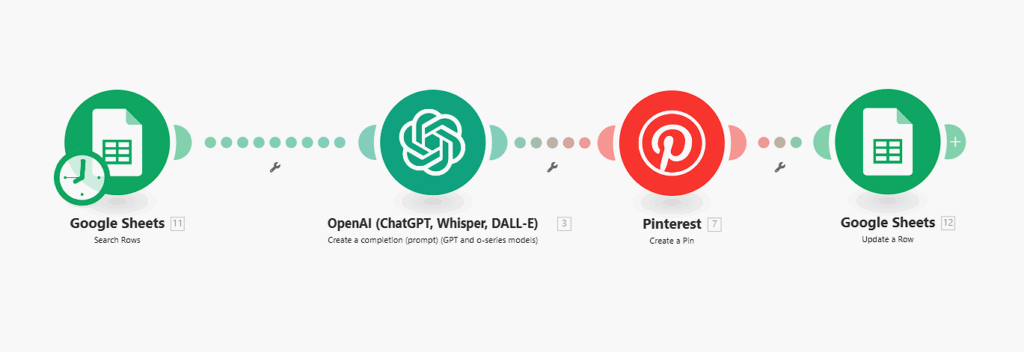
The Four-Module Workflow
This workflow operates like a production line that runs once daily. Each module handles a specific function, and together they create an automated content publishing system.
Module 1: Row Reader (Google Sheets)
A Google Sheets module configured to “Get a row” finds the next unpublished entry in the spreadsheet. It looks for the row where the “Posted” field shows “No” and retrieves that product’s data and image URL. This ensures the workflow processes content sequentially without skipping or duplicating posts.
Module 2: Content Optimization (ChatGPT)
This is where generic product descriptions become Pinterest-optimized content. The ChatGPT module receives the product title and description from the spreadsheet and processes it through a specific prompt.
For a jewelry brand, the prompt instructs ChatGPT to create Pinterest descriptions under 300 characters with a minimalist, modern tone. It focuses on materials, finishes, and emotional hooks while generating relevant hashtags. The AI returns a JSON response with the optimized description.
Here’s the actual prompt used:
You are writing Pinterest content for a jewelry brand. Based on the product title and description provided, create a concise and engaging Photo description

Writing Guidelines:
- Use a minimalist, modern, and confident tone.
- The first sentence is the hook. No colons, dashes, or filler. Focus on what's visually or materially striking.
- The description must be under 300 characters. Highlight the material, finish, unique features, and a touch of emotion or value
- Use 4-6, 1-2 word hashtags at the end relevant to the description, include the hashtag #brandname, and the others are related to keywords in the ring description

Respond only with a JSON object like this:
{"description":"..."}
Do not add any text before or after it.
Module 3: Pin Creation (Pinterest)
The Pinterest module takes the AI-optimized description and creates the actual pin. It uses the image URL from the spreadsheet to grab the product photo and publishes everything to the designated Pinterest board. The pin goes live automatically with GPT-quality copy.
Module 4: Status Update (Google Sheets)
The final module updates the spreadsheet to mark the current row as “Posted: Yes.” This tells the system that this particular product has been published, so tomorrow’s workflow run will move to the next unpublished item. This creates a sequential publishing queue that works through your entire product catalog systematically.
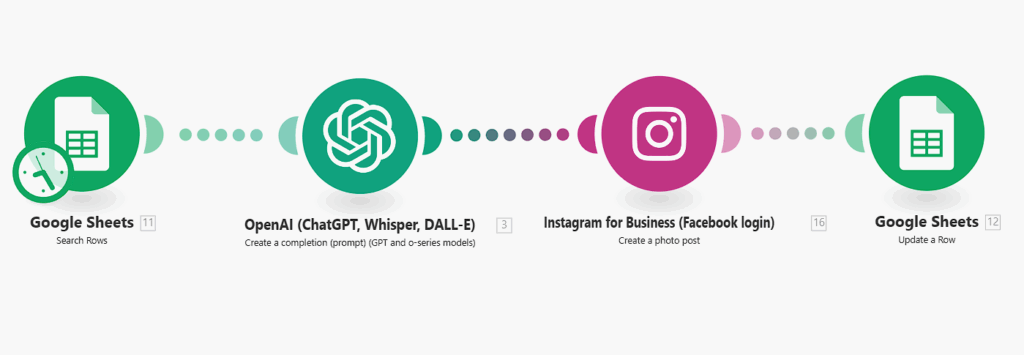
The Instagram Extension
The same workflow structure works for Instagram: it uses a duplicated spreadsheet. The Instagram workflow has its own copy of the product data, allowing independent scheduling and tracking.
Module 3 gets swapped from Pinterest’s “Create a Pin” to Instagram’s “Create a Photo Post” module. Same AI optimization, different platform. The ChatGPT prompt can be adjusted for Instagram’s different format requirements and audience expectations.
Those 400 pieces of Pinterest content become 800 pieces across both platforms. Each platform runs on its own schedule with its own tracking system, so you can post to Pinterest daily and Instagram three times per week, for example.
Why This Approach Works
The key is the AI optimization layer. Instead of posting duplicated product descriptions, ChatGPT transforms them into platform-appropriate content. Each pin gets fresh copy that’s written specifically for Pinterest’s audience and format requirements.
The tracking system prevents chaos. You can see what’s published, plan content schedules, and identify successful pins for analysis.
Results
This system runs in the background while you focus on business operations. Pinterest analytics show consistent engagement increases from content that posts itself, and the AI-generated descriptions perform better than manual efforts ever did.
The upfront time investment pays off for months. Instead of daily Pinterest management, you have a system that handles content creation and publishing automatically.
Ready to build something similar? The tools are available, and free to use. You just need to connect them properly.